


Why Elden Ring Nightreign is Perfect for Content Creation
Elden Ring Nightreign burst onto the scene in 2025 as one of FromSoftware's most ambitious projects, reimagining the beloved Elden Ring universe with a roguelike co-op twist. Up to three players team up to face procedurally generated challenges, culminating in epic multi-phase boss encounters that demand coordination, skill, and nerve. Every run is different — different paths, different enemy placements, different final bosses — which means no two recordings are ever the same.
This unpredictable, high-stakes format is a content creator's dream. A clutch revival from a fallen teammate, a perfectly timed parry on a nightmarish field boss, or a chaotic three-way attempt against the Night Lord — these are the moments that rack up views on YouTube, go viral on TikTok, and pull in live viewers on Twitch. Nightreign's stunning dark fantasy visuals, FromSoftware's signature bone-crunching hit feedback, and the raw emotion of co-op highs and lows combine into content that is genuinely compelling to watch.
The challenge is capturing all of that intensity without sacrificing performance. Souls-like games punish even the smallest lag spike, and a dropped frame at the wrong moment can cost your entire run. That's exactly why you need a recorder built for demanding games — and that's where LosslessRec comes in.
LosslessRec: Built for Demanding Souls-like Games
FromSoftware titles are notorious for pushing PC hardware to its limits. Elden Ring Nightreign is no exception — its sprawling environments, dynamic lighting in underground dungeons, and particle-heavy boss arenas all place heavy demands on your GPU. Add a recording process on top of that, and lesser software will either tank your frame rate or produce muddy footage that fails to do the game justice.
LosslessRec was engineered with exactly this kind of scenario in mind. Here is why it excels for Nightreign specifically:
Color Accuracy in Dark Environments: Nightreign's world is shrouded in a perpetual encroaching darkness — its moody, low-light environments are part of what makes the game so atmospheric. Standard recording software using aggressive compression crushes the shadows, turning detailed dark areas into a murky mess. LosslessRec's lossless color capture retains every subtle shade in those dark zones, so your recordings look exactly as rich and detailed as the live game.
High-FPS Capture for Fast Combat: Nightreign's combat is lightning fast. Bosses telegraph attacks with rapid wind-ups, and the difference between a clean dodge and getting one-shot can be a single frame. LosslessRec supports up to 4K/120 FPS capture, ensuring that every swift sword arc, every rolling dodge, and every explosive spell impact is rendered with crystal clarity rather than blurred into an unreadable smear.
Multi-Track Audio for Co-op Communication: Co-op is the heart of Nightreign, and your viewers want to hear the banter, the callouts, and the victory screams alongside the game's dramatic soundtrack and sound effects. LosslessRec records game audio, microphone input, and system sounds as separate tracks simultaneously. This gives you full control in post-production — boost your teammates' voices, isolate the boss theme, or clean up background noise without touching the rest of your audio mix.
Zero Performance Impact: LosslessRec uses hardware-accelerated encoding, offloading the encoding workload to your GPU's dedicated video encoder (NVENC for NVIDIA, VCE for AMD). This means your CPU and main GPU compute resources remain fully dedicated to running Nightreign at maximum frame rates. You record and play at the same time, with no perceptible performance hit.
LosslessRec vs. Competitors: Key Differences
| Feature | LosslessRec | OBS Studio | Bandicam | NVIDIA ShadowPlay |
|---|---|---|---|---|
| Resolution & FPS | 4K/120 FPS (up to 8K via AI upscaling) | 4K/60 FPS (manual configuration required) | 4K/60 FPS (H.264 only) | 4K/60 FPS (NVIDIA GPU exclusive) |
| Encoding | Hardware-accelerated H.265/HEVC (40% smaller file size than H.264) | H.264 (CPU-intensive; requires complex settings) | H.264 only (no H.265 support) | H.264 (NVIDIA NVENC hardware encoding) |
| Performance Impact | Zero lag (CPU usage <15% on RTX 3060) | High CPU usage for 4K/60 FPS; may require GPU overclocking | Lower CPU usage but limited to H.264 | Low impact but limited to NVIDIA GPUs |
| Audio Handling | Multi-track recording (game audio, mic, system sound) with AI noise cancellation | Basic audio mixing; no noise cancellation | Single audio track; no advanced processing | Basic audio capture; no multi-track support |
| Ease of Use | Plug-and-play setup; no technical expertise required | Steep learning curve; requires manual configuration for optimal settings | User-friendly but limited to basic features | Simple interface but lacks advanced controls |
| AI Features | AI-driven dynamic resolution scaling, noise reduction, and 8K upscaling | No AI features | No AI integration | No AI capabilities |
| Pricing | Free trial; Premium $19.99/year | Free (open-source) | $39.95 one-time purchase | Free (bundled with NVIDIA GeForce Experience) |
How to Record Elden Ring Nightreign in 3 Steps
Step 1 Install & Launch LosslessRec
Download the PC version (Windows 10+/Steam Deck compatible) and install it in under a minute. No account or sign-up required for the free tier.
Step 2 Configure Your Settings
- Resolution: Set to 1440p for the ideal balance of visual quality and file size. If your rig runs Nightreign at 4K, match it for maximum detail — especially important for capturing Nightreign's intricate boss designs and dark environmental art.
- Frame Rate: Set to 60 FPS minimum. For high-refresh-rate monitors, match your in-game FPS cap (e.g., 120 FPS) to ensure smooth slow-motion clips during post-processing.
- Audio: Enable "Game Audio + Mic" to capture Nightreign's haunting score, combat sounds, and your co-op team's voice chat simultaneously on separate tracks.
- Hotkeys: By default, the shortcut key for Start/Stop is Alt + 1/2. Remap these to keys that won't conflict with Nightreign's in-game controls.
Step 3 Launch the Game, Select Game Mode, and Record
In the LosslessRec main interface, select Game Mode — it will automatically detect the Nightreign window and optimize capture settings for a full-screen game. Hit the record hotkey before your session starts and let LosslessRec run invisibly in the background while you focus on surviving the night.
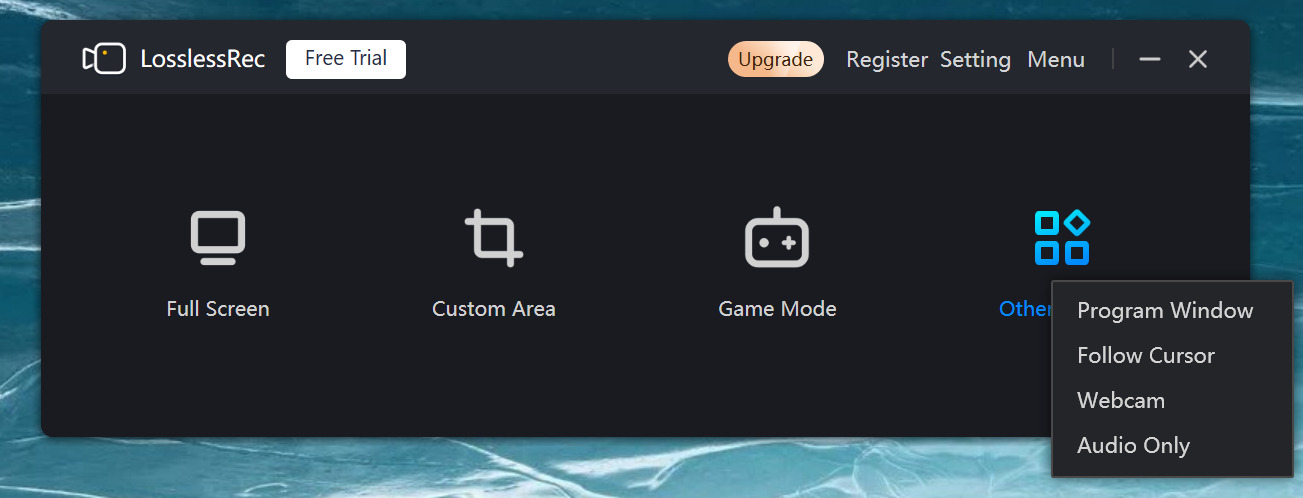
After your session, open the built-in editor to trim dead time between runs, cut together your best boss moments, and export directly in your preferred format for upload to YouTube, Twitch, or TikTok.
Best Recording Settings for Elden Ring Nightreign
Nightreign's visual design places unique demands on your recording setup. Here are the optimized settings to get the best results:
Resolution — Match Your Display: Record at your native resolution. For most players this will be 1080p or 1440p. Do not upscale — recording at a higher resolution than your display produces no quality benefit and wastes storage. If you play at 1440p, record at 1440p.
Bitrate — Go Higher for Dark Scenes: Nightreign's dark environments are the biggest challenge for video compression. Low-bitrate recordings of dark scenes produce ugly compression artifacts called "blocking" — large, ugly squares in shadow areas. To avoid this, use a higher bitrate than you would for a brightly lit game. Recommended settings:
- 1080p/60fps: 25–35 Mbps (H.265/HEVC) or 50–60 Mbps (H.264)
- 1440p/60fps: 40–60 Mbps (H.265/HEVC) or 80–100 Mbps (H.264)
- 4K/60fps: 80–120 Mbps (H.265/HEVC)
LosslessRec's H.265/HEVC encoding gives you significantly better quality at the same bitrate compared to H.264, which is especially noticeable in dark, detail-rich areas like Nightreign's underground caverns and nighttime outdoor zones.
Audio — Capturing Co-op Voice Chat: Set LosslessRec to record three separate audio tracks: (1) Game Audio — Nightreign's music and sound effects; (2) Microphone — your own voice; (3) System Audio — your teammates' voices coming through Discord or Steam voice chat. With separate tracks, you can independently adjust levels in editing, making it easy to create clean, well-mixed videos where the boss music swells dramatically while your callouts remain clear and audible.
Storage — Plan Ahead for Long Sessions: A full three-player Nightreign session can run 60–90 minutes. At 1440p/60fps with H.265, expect approximately 15–20 GB per hour of raw footage. Make sure you have a fast NVMe SSD with sufficient free space before you start a recording session to avoid mid-session interruptions.
Tips for Creating Viral Nightreign Content
Having great footage is just the first step. Here is how to turn your Nightreign recordings into content that actually gets discovered and watched:
Optimize Your YouTube Titles and Thumbnails: Include high-traffic keywords in your video titles to maximize search discoverability. Strong title formulas include: "Elden Ring Nightreign Boss Fight — [Boss Name] Defeated", "Elden Ring Nightreign Co-op Highlights", "Hardest Boss in Nightreign — First Try". Use a thumbnail that shows the boss in dramatic contrast against your character — the visual spectacle of FromSoftware's boss designs is a powerful click magnet.
Create Boss-Specific Highlight Clips: Nightreign's multi-phase bosses are among the most visually spectacular in gaming. Clip the final phase of each boss separately and upload them as standalone shorts or TikToks alongside your full run video. A 60-second clip of a dramatic last-second kill on a field boss can reach audiences that would never watch a full-length VOD.
Leverage the Co-op Comedy: Some of the most viral Nightreign content is not about skill — it is about chaos. Team wipes at full HP, friendly fire accidents, and clutch moments where one player carries a failing run are universally entertaining. Enable your microphone and capture your team's genuine reactions. Authentic moments resonate with audiences far more than polished highlight reels.
Tag and Categorize Correctly: On YouTube, use tags like "Elden Ring Nightreign", "Nightreign boss fight", "Elden Ring Nightreign co-op", "FromSoftware 2025", and "Nightreign gameplay recording". In your description, include a timestamp breakdown of each boss fight — this improves watch time metrics as viewers jump to specific moments, which YouTube's algorithm rewards with broader recommendations.
Post Consistently During Peak Interest Windows: Nightreign content performs best when new bosses, patches, or updates are released. Have LosslessRec running every session so you never miss a landmark moment. The content you record today could become a reference video that continues pulling views for years as new players discover the game.