


Why Short-Form Gaming Content is Dominating Social Media in 2026
If you haven't noticed, short-form video has completely taken over the internet — and gaming content is leading the charge. YouTube Shorts now generates over 2 billion daily views for gaming content alone, making it one of the most powerful discovery engines for new creators. TikTok's gaming community has exploded into hundreds of millions of active users who consume bite-sized clips of epic plays, hilarious fails, and jaw-dropping moments every single day. Instagram Reels rounds out the trio, offering yet another massive audience hungry for high-energy, visually stunning gaming content.
The magic formula is simple: clips between 15 and 60 seconds that capture something extraordinary. A perfectly timed headshot. An impossible last-second comeback. A glitch so funny it breaks the internet. These moments — when recorded in crisp, high-quality video — routinely rack up millions of views and tens of thousands of new followers overnight. The platform algorithms are deliberately designed to reward this kind of engaging short content, pushing it to cold audiences who have never heard of you before.
For gaming content creators in 2026, this represents an unprecedented opportunity. You don't need an existing audience. You don't need expensive equipment. You just need the right screen recording software to capture those golden moments the moment they happen — and that's exactly where LosslessRec comes in. Whether you play Fortnite, Valorant, Minecraft, or any other game, recording short-form gaming clips for TikTok and YouTube Shorts has never been easier.
What Makes a Viral Gaming Clip
Not every gaming moment goes viral — but the ones that do share a handful of common traits. Understanding these elements will help you record more intentionally and build a massive following through short-form content.
Unexpected & Shocking Moments: The clips that explode on YouTube Shorts and TikTok are almost always ones that defy expectations. A 1v5 clutch, an impossible long-range snipe, a hilarious bug — these moments make viewers stop scrolling and hit the share button.
Skillful Plays & Satisfying Combos: Competency porn is real. Watching someone execute a flawless combo or make a game-winning play triggers a dopamine hit that keeps viewers coming back. These clips perform especially well in games with complex mechanics like fighting games, MOBAs, or tactical shooters.
Funny Fails & Relatable Moments: Content doesn't have to be impressive — it just needs to be engaging. Relatable gaming fails, rage moments, or unexpected deaths can be just as viral as clutch plays, especially when paired with good editing and audio.
Recording Quality Is Non-Negotiable: Here's where many aspiring creators fall short. A viral moment recorded with poor quality — blurry resolution, choppy framerate, distracting watermarks — will underperform every single time. Modern platforms compress video already; if you start with low-quality footage, the end result looks terrible. The minimum standard for competitive short-form gaming content in 2026 is 1080p at 60fps, clean audio, and absolutely zero watermarks.
LosslessRec was built specifically to meet and exceed these standards. Its hardware-accelerated engine captures your gameplay at full resolution and full framerate with zero lag and crystal-clear clarity. Every frame is preserved exactly as it appears on your screen, giving you the pristine source footage you need to create scroll-stopping viral clips for TikTok, YouTube Shorts, and Instagram Reels.
LosslessRec vs. Competitors: Key Differences for Short-Form Creators
| Feature | LosslessRec | OBS Studio | Bandicam | NVIDIA ShadowPlay |
|---|---|---|---|---|
| Quick Clip Extraction | Built-in instant clip trimmer; export in seconds | No built-in editor; requires third-party software | Basic trim only; limited export speed | Instant replay clip saving (last 30s–20min) |
| Output Format Flexibility | MP4, AVI, MOV, MKV; H.264 & H.265 support | Wide format support but complex to configure | MP4 and AVI only; H.264 limited | MP4 only (NVIDIA NVENC) |
| Recording Quality | Up to 4K/120 FPS; lossless color accuracy | Up to 4K/60 FPS; quality varies with settings | Up to 4K/60 FPS; H.264 compression artifacts | Up to 4K/60 FPS; NVIDIA GPU required |
| Ease of Trimming | One-click trim to 15–60s; direct platform export | No native trim; must use external editor | Basic cut tool; no direct short-form export | Basic clip cutting in GeForce Experience |
| Performance Impact | Zero lag; CPU usage <15% on mid-range GPU | High CPU usage; may cause FPS drops | Low-moderate impact; stable performance | Minimal impact (NVIDIA GPU hardware encoding) |
| Vertical Recording Support | Custom aspect ratio including 9:16 vertical | Supports custom canvas but complex setup | No native vertical recording mode | No native vertical recording support |
| Pricing | Free trial; Premium $19.99/year | Free (open-source) | $39.95 one-time purchase | Free (bundled with NVIDIA GeForce Experience) |
How to Record Gaming Clips for Shorts & TikTok in 3 Steps
Step 1 Install & Launch LosslessRec
Download and install LosslessRec on your Windows PC (compatible with Windows 10 and later). The installation takes under two minutes, and no technical expertise is required to get started.
Step 2 Configure for Short-Form Content
- Resolution & FPS: Set output to 1080p at 60fps as a minimum. For TikTok and Reels, configure a custom 9:16 vertical canvas if your game supports it, or record 16:9 and crop in the built-in editor.
- Hotkeys: Enable the instant clip hotkey (default Alt+1/2) so you can capture highlight moments mid-game without interrupting your flow. Customize hotkeys to whatever feels natural.
- Audio: Enable "Game Audio + Mic" dual-track recording to capture both immersive game sound and your live commentary. Clean audio is just as important as sharp visuals for viral short-form content.
Step 3 Play, Capture, and Trim to 15–60 Seconds
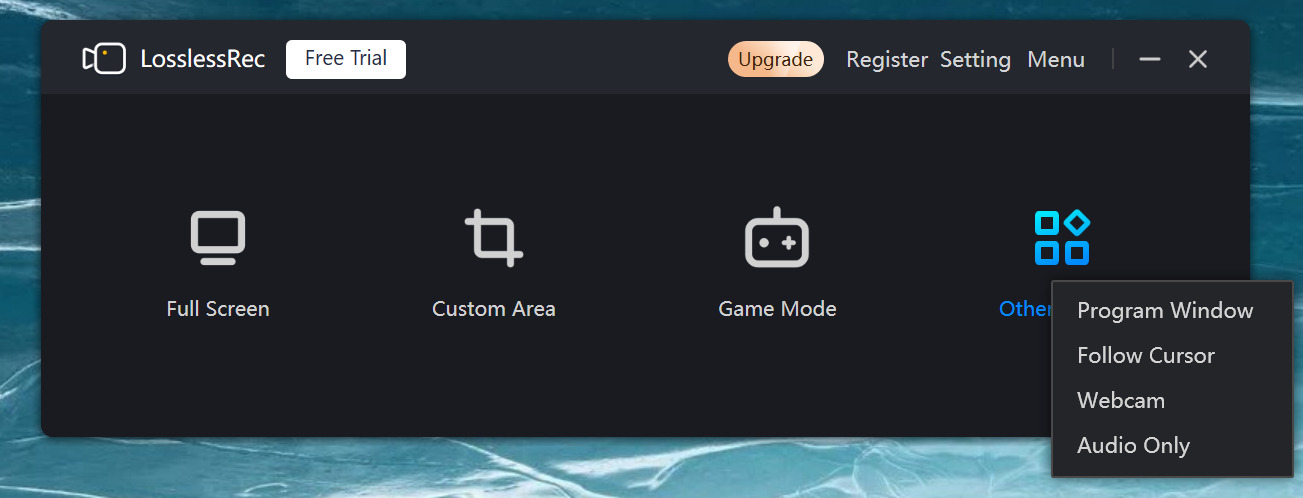
Launch your game and select your recording mode in LosslessRec — Full Screen, Game Mode, or Program Window all work great for capturing gameplay clips for YouTube Shorts and TikTok. When an epic moment happens, hit your hotkey to save the clip instantly. After your session, open the built-in editor to trim your highlight down to the perfect 15–60 second window, add any text overlays, and export as MP4 ready for direct upload.
Best Recording Settings for Short-Form Gaming Content
Getting your settings right from the start means less editing work later and better-performing content on every platform. Here are the optimal LosslessRec settings specifically tuned for short-form gaming content creators:
Resolution — 1080p Minimum, 1440p or 4K Preferred: Platforms like TikTok and YouTube Shorts re-compress your video during upload, which degrades quality. Starting with 1080p at minimum (1440p or 4K is even better) ensures your final published clip still looks sharp and professional after platform compression. Never record short-form gaming content at 720p in 2026 — it simply won't compete.
Aspect Ratio — 9:16 for TikTok & Reels, 16:9 for YouTube Shorts: TikTok and Instagram Reels are vertical-first platforms. If your game allows it, configure LosslessRec's custom canvas to record in 9:16 (vertical) orientation directly, eliminating the need to crop later. YouTube Shorts actually supports both vertical and horizontal clips, though vertical performs better on mobile. Record 16:9 for YouTube Shorts and crop to 9:16 in post if targeting both platforms.
Frame Rate — 60fps is the Standard: Fast-paced gaming content — especially shooters, battle royales, and action games — looks dramatically smoother at 60fps versus 30fps. Viewers notice the difference even if they can't articulate why. Always record at 60fps minimum. If your PC can handle it, 120fps source footage gives you the option for slow-motion effects during editing, which can make highlight clips even more impactful.
Bitrate — Go High for Platform Re-Compression: Set LosslessRec's bitrate to at least 20 Mbps for 1080p/60fps. The higher the source bitrate, the better your clip will look after TikTok and YouTube's aggressive re-compression algorithms process it. Use H.264 encoding for maximum platform compatibility — both TikTok and YouTube Shorts handle H.264 MP4 files best.
Output Format — MP4 H.264 for Universal Compatibility: Always export your final clips as MP4 with H.264 encoding. This format is universally accepted by TikTok, YouTube Shorts, Instagram Reels, and Twitter, with no transcoding issues or upload errors. LosslessRec's one-click MP4 export makes this completely painless.
Platform-Specific Tips for Maximum Reach
Recording great gaming clips is only half the battle. Knowing how each platform's algorithm works and optimizing your posts accordingly will dramatically increase your reach and follower growth. Here's what works best on each platform in 2026:
YouTube Shorts — Leverage Search & Trending Games: YouTube Shorts uniquely benefits from YouTube's massive search engine. Use highly searchable titles and descriptions packed with game-specific keywords like the game name, character names, and gameplay terms. Post during peak hours in your target audience's timezone (typically 6–9 PM EST/PST on weekdays). The most critical element: your first 3 seconds must hook the viewer immediately. Start with the most exciting frame of your clip — the explosive moment, the clutch play, the funny reaction — don't bury the lead. Use trending game hashtags (#YouTubeShorts, #GamingShorts, #[GameName]) in every post.
TikTok — Trending Sounds & Gaming Community: TikTok's algorithm is uniquely driven by audio trends. Pairing your gaming highlight clip with a currently trending sound or music track can 10x your reach overnight. The TikTok gaming community (#GamingTikTok, #GameClips, #[GameName]) is enormous and highly engaged — use relevant hashtags but don't overload (5–8 focused hashtags outperform 20+ generic ones). Post consistently — TikTok rewards creators who publish daily short-form content. Consider making your clips "duet-friendly" by leaving space on screen for reaction creators to add their response, which multiplies your distribution.
Instagram Reels — Visual Quality & Text Overlays: Instagram audiences skew toward visually polished content. Your gaming clips for Reels need to look pristine — this is exactly why recording in high bitrate 1080p+ with LosslessRec is essential. Add text overlays explaining what's happening ("1v5 clutch incoming...", "IMPOSSIBLE shot") to guide viewers through the moment, especially since many watch on mute. Carousel posts work brilliantly on Instagram for longer gaming tutorials or step-by-step guides — pair Reels for viral highlights with carousel posts for deeper engagement. Use Reels for viral gaming moments and leverage your audience there to drive views to longer YouTube content.
The key insight that top gaming short-form creators have learned: volume and consistency beat perfection. Post frequently, analyze which clip types perform best on each platform, and double down on what resonates. LosslessRec's instant hotkey capture and quick export workflow is specifically designed to help you maintain that pace — record gaming clips for TikTok and YouTube Shorts fast, without sacrificing the quality that makes those clips worth watching in the first place.